1. 介绍
基于verdaccio在公司内网搭建npm包托管平台, 可上传npm私有包, 可下载npm官网包并实现缓存。
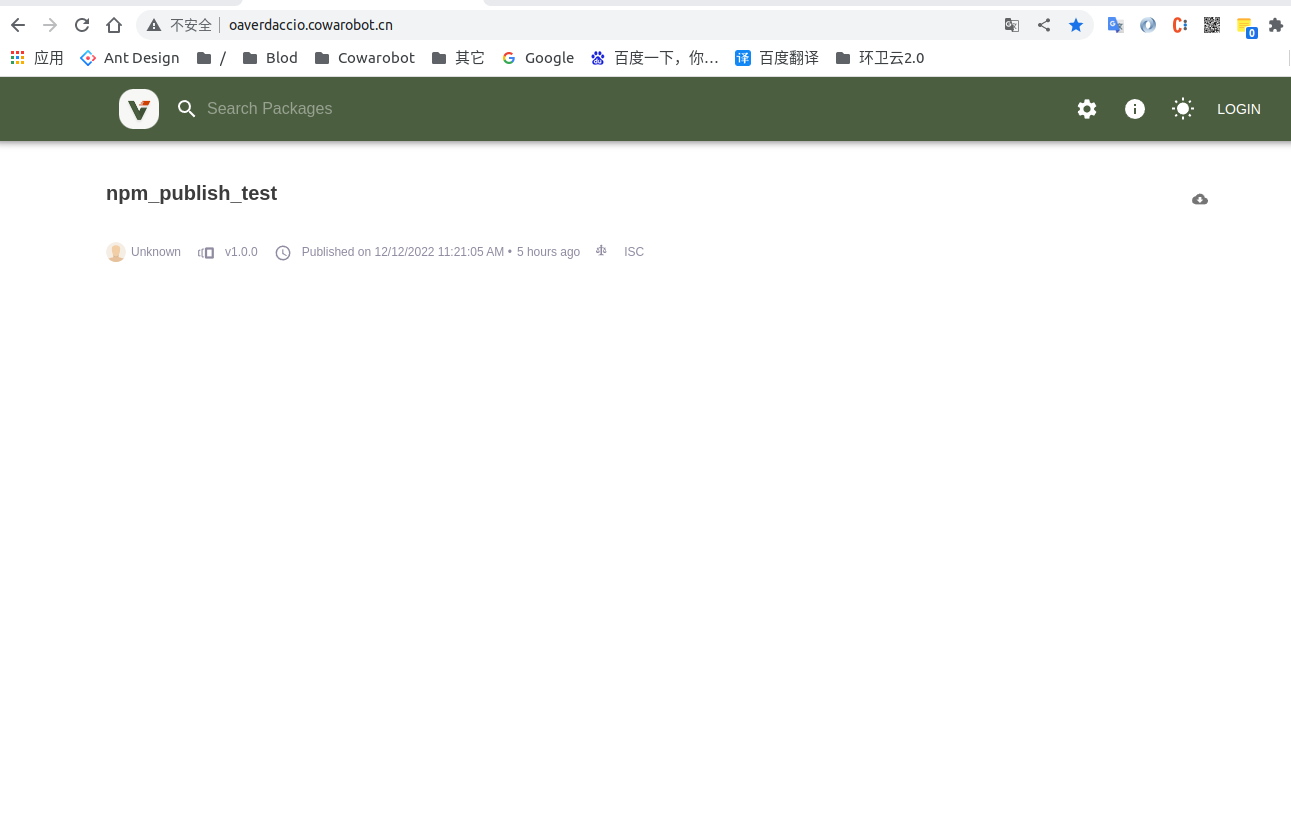
最终网站看起来是这个样子
1.1 基于docker安装verdaccio服务
1 | docker pull verdaccio/verdaccio |
1.2 直接启动服务测试
1 | sudo docker run -it --rm --name verdaccio -p 4873:4873 -v /home/user/verdaccio/storage:/verdaccio/storage -v /home/user/verdaccio/conf:/verdaccio/conf -v /home/user/verdaccio/plugins:/verdaccio/plugins verdaccio/verdaccio |
该命令将docker中的storage,conf,plugin映射到/home/user/verdaccio目录下, 方便管理
1.3 配置conf
将docker容器中的conf拷贝出来
1
2
docker ps -a #查看docker容器id
sudo docker cp 5a2v1q1pw3e5d:/verdaccio/conf /home/user/verdaccio/conf打开conf中的config.yaml更改配置为如下:
1
2
3
4
5
6
7
8
9
10
11
12
13
14
15
16
17
18
19
20
21
22
23
24
25
26
27
28
29
30
31
32
33
34
35
36
37
38
39
40
41
42
43
44
45
46
47
48
49
50
51
52
53
54
55
56
57
58
59
60
61
62
63
64
65
66
67
68
69
70
71
72
73
74
75
76
77
78
79
80
81
82
83
84
85
86
87
88
89
90
91
92
93
94
95
96
97
98
99
100
101
102
103
104
105
106
107
108
109
110
111
112
113
114
115
116
117
118
119
120
121
122
123
124
125
126
127
128
129
130
131
132
133
134
135
136
137
138
139
140
141
142
143
144
145
146
147
148
149
150
151
152
153
154
155
156
157
158
159
160
161
162
163
164
165
166
167
168
169
170
171
172
173
174
175
176
177
178
179
180
181
182
183
184
185
186
187
188
189
190
191
192
193
194
195
196
197
198
199
200
201
#
# This is the default configuration file. It allows all users to do anything,
# please read carefully the documentation and best practices to
# improve security.
#
# Do not configure host and port under `listen` in this file
# as it will be ignored when using docker.
# see https://verdaccio.org/docs/en/docker#docker-and-custom-port-configuration
#
# Look here for more config file examples:
# https://github.com/verdaccio/verdaccio/tree/5.x/conf
#
# Read about the best practices
# https://verdaccio.org/docs/best
# path to a directory with all packages
storage: /verdaccio/storage
# path to a directory with plugins to include
plugins: /verdaccio/plugins
# https://verdaccio.org/docs/webui
web:
title: Verdaccio
# comment out to disable gravatar support
# gravatar: false
# by default packages are ordercer ascendant (asc|desc)
# sort_packages: asc
# convert your UI to the dark side
# darkMode: true
# html_cache: true
# by default all features are displayed
# login: true
# showInfo: true
# showSettings: true
# In combination with darkMode you can force specific theme
# showThemeSwitch: true
# showFooter: true
# showSearch: true
# showRaw: true
# showDownloadTarball: true
# HTML tags injected after manifest <scripts/>
# scriptsBodyAfter:
# - '<script type="text/javascript" src="https://my.company.com/customJS.min.js"></script>'
# HTML tags injected before ends </head>
# metaScripts:
# - '<script type="text/javascript" src="https://code.jquery.com/jquery-3.5.1.slim.min.js"></script>'
# - '<script type="text/javascript" src="https://browser.sentry-cdn.com/5.15.5/bundle.min.js"></script>'
# - '<meta name="robots" content="noindex" />'
# HTML tags injected first child at <body/>
# bodyBefore:
# - '<div id="myId">html before webpack scripts</div>'
# Public path for template manifest scripts (only manifest)
# publicPath: http://somedomain.org/
# https://verdaccio.org/docs/configuration#authentication
auth:
htpasswd:
file: /verdaccio/storage/htpasswd
# Maximum amount of users allowed to register, defaults to "+infinity".
# You can set this to -1 to disable registration.
# max_users: 1000
# Hash algorithm, possible options are: "bcrypt", "md5", "sha1", "crypt".
# algorithm: bcrypt # by default is crypt, but is recommended use bcrypt for new installations
# Rounds number for "bcrypt", will be ignored for other algorithms.
# rounds: 10
# https://verdaccio.org/docs/configuration#uplinks
# a list of other known repositories we can talk to
uplinks:
npmjs:
url: https://registry.npmjs.org/
# Learn how to protect your packages
# https://verdaccio.org/docs/protect-your-dependencies/
# https://verdaccio.org/docs/configuration#packages
packages:
'@*/*':
# scoped packages
access: $all
publish: $authenticated
unpublish: $authenticated
proxy: npmjs
'**':
# allow all users (including non-authenticated users) to read and
# publish all packages
#
# you can specify usernames/groupnames (depending on your auth plugin)
# and three keywords: "$all", "$anonymous", "$authenticated"
access: $all
# allow all known users to publish/publish packages
# (anyone can register by default, remember?)
publish: $authenticated
unpublish: $authenticated
# if package is not available locally, proxy requests to 'npmjs' registry
proxy: npmjs
# To improve your security configuration and avoid dependency confusion
# consider removing the proxy property for private packages
# https://verdaccio.org/docs/best#remove-proxy-to-increase-security-at-private-packages
# https://verdaccio.org/docs/configuration#server
# You can specify HTTP/1.1 server keep alive timeout in seconds for incoming connections.
# A value of 0 makes the http server behave similarly to Node.js versions prior to 8.0.0, which did not have a keep-alive timeout.
# WORKAROUND: Through given configuration you can workaround following issue https://github.com/verdaccio/verdaccio/issues/301. Set to 0 in case 60 is not enough.
server:
keepAliveTimeout: 60
# Allow `req.ip` to resolve properly when Verdaccio is behind a proxy or load-balancer
# See: https://expressjs.com/en/guide/behind-proxies.html
# trustProxy: '127.0.0.1'
# https://verdaccio.org/docs/configuration#offline-publish
publish:
allow_offline: true
# https://verdaccio.org/docs/configuration#url-prefix
# url_prefix: /verdaccio/
# VERDACCIO_PUBLIC_URL='https://somedomain.org';
# url_prefix: '/my_prefix'
# // url -> https://somedomain.org/my_prefix/
# VERDACCIO_PUBLIC_URL='https://somedomain.org';
# url_prefix: '/'
# // url -> https://somedomain.org/
# VERDACCIO_PUBLIC_URL='https://somedomain.org/first_prefix';
# url_prefix: '/second_prefix'
# // url -> https://somedomain.org/second_prefix/'
# https://verdaccio.org/docs/configuration#security
# security:
# api:
# legacy: true
# jwt:
# sign:
# expiresIn: 29d
# verify:
# someProp: [value]
# web:
# sign:
# expiresIn: 1h # 1 hour by default
# verify:
# someProp: [value]
# https://verdaccio.org/docs/configuration#user-rate-limit
# userRateLimit:
# windowMs: 50000
# max: 1000
# https://verdaccio.org/docs/configuration#max-body-size
# max_body_size: 10mb
# https://verdaccio.org/docs/configuration#listen-port
# listen:
# - localhost:4873 # default value
# - http://localhost:4873 # same thing
# - 0.0.0.0:4873 # listen on all addresses (INADDR_ANY)
# - https://example.org:4873 # if you want to use https
# - "[::1]:4873" # ipv6
# - unix:/tmp/verdaccio.sock # unix socket
# The HTTPS configuration is useful if you do not consider use a HTTP Proxy
# https://verdaccio.org/docs/configuration#https
# https:
# key: ./path/verdaccio-key.pem
# cert: ./path/verdaccio-cert.pem
# ca: ./path/verdaccio-csr.pem
# https://verdaccio.org/docs/configuration#proxy
# http_proxy: http://something.local/
# https_proxy: https://something.local/
# https://verdaccio.org/docs/configuration#notifications
# notify:
# method: POST
# headers: [{ "Content-Type": "application/json" }]
# endpoint: https://usagge.hipchat.com/v2/room/3729485/notification?auth_token=mySecretToken
# content: '{"color":"green","message":"New package published: * {{ name }}*","notify":true,"message_format":"text"}'
middlewares:
audit:
enabled: true
# https://verdaccio.org/docs/logger
# log settings
logs: { type: stdout, format: pretty, level: http }
#experiments:
# # support for npm token command
# token: false
# # enable tarball URL redirect for hosting tarball with a different server, the tarball_url_redirect can be a template string
# tarball_url_redirect: 'https://mycdn.com/verdaccio/${packageName}/${filename}'
# # the tarball_url_redirect can be a function, takes packageName and filename and returns the url, when working with a js configuration file
# tarball_url_redirect(packageName, filename) {
# const signedUrl = // generate a signed url
# return signedUrl;
# }
# translate your registry, api i18n not available yet
# i18n:
# list of the available translations https://github.com/verdaccio/verdaccio/blob/master/packages/plugins/ui-theme/src/i18n/ABOUT_TRANSLATIONS.md
# web: en-US注意storage, plugins为主机存储的目录(即在/home/user/verdaccio/目录下的两个文件夹);可自定义位置,建议和conf放在一起便于管理
注意uplinks下的配置,默认私有npm没有的包会从该配置下载, 可配多个,下载时会依次查找相应的包, 建议配置一个即可
注意publish, 如果有上传私有包的需求,可将allow_offline设置为true
1.4 优化启动流程,通过docker-compose启动
在/home/user/verdaccio目录下新建docker-compose.yml文件, 内容如下
1 | version: '3' |
通过docker-compose.yml启动docker,进入yml文件所在目录执行命令
1 | sudo docker-compose up -d # -d 是保持后台运行 |
2. 通过私有仓库下载包
2.1 注册用户
1 | npm set registry https://prive.server.npm #设置npm registry为私有仓库地址(该地址为demo地址, 真实地址一般为http://localhost:4873, 可自行配置域名等等) |
2.2 校验是否注册成功
打开https://prive.server.npm后, 点击右上角LOGIN按钮打开登陆弹窗,输入刚刚注册的用户名和密码
2.3 发布私有npm包
开发好私有包后, 进入包的根目录输入npm login登录, 然后执行npm publish发布私有包,同github上传node_modules流程一致,可参考 github上传node_modules 中的1.6,1.7 且不需要配置.npmrc
2.4 注意
verdaccio网站默认只会显示上传的私有npm包, 如果想显示已经缓存的npm官网的包, 需要更改/verdaccio/storage/.verdaccio-db.json文件
自己将想显示的包名添加到list中
__END__

文章出处:内网搭建私有npm仓库
作者签名:简单地活着, 肆意又精彩.
关于主题:Hexo - Live For Code
版权声明:文章除特别声明外,均采用 BY-NC-SA 许可协议,转载请注明出处